Accounting & reports
Books that keep themselves, your accountant just reviews
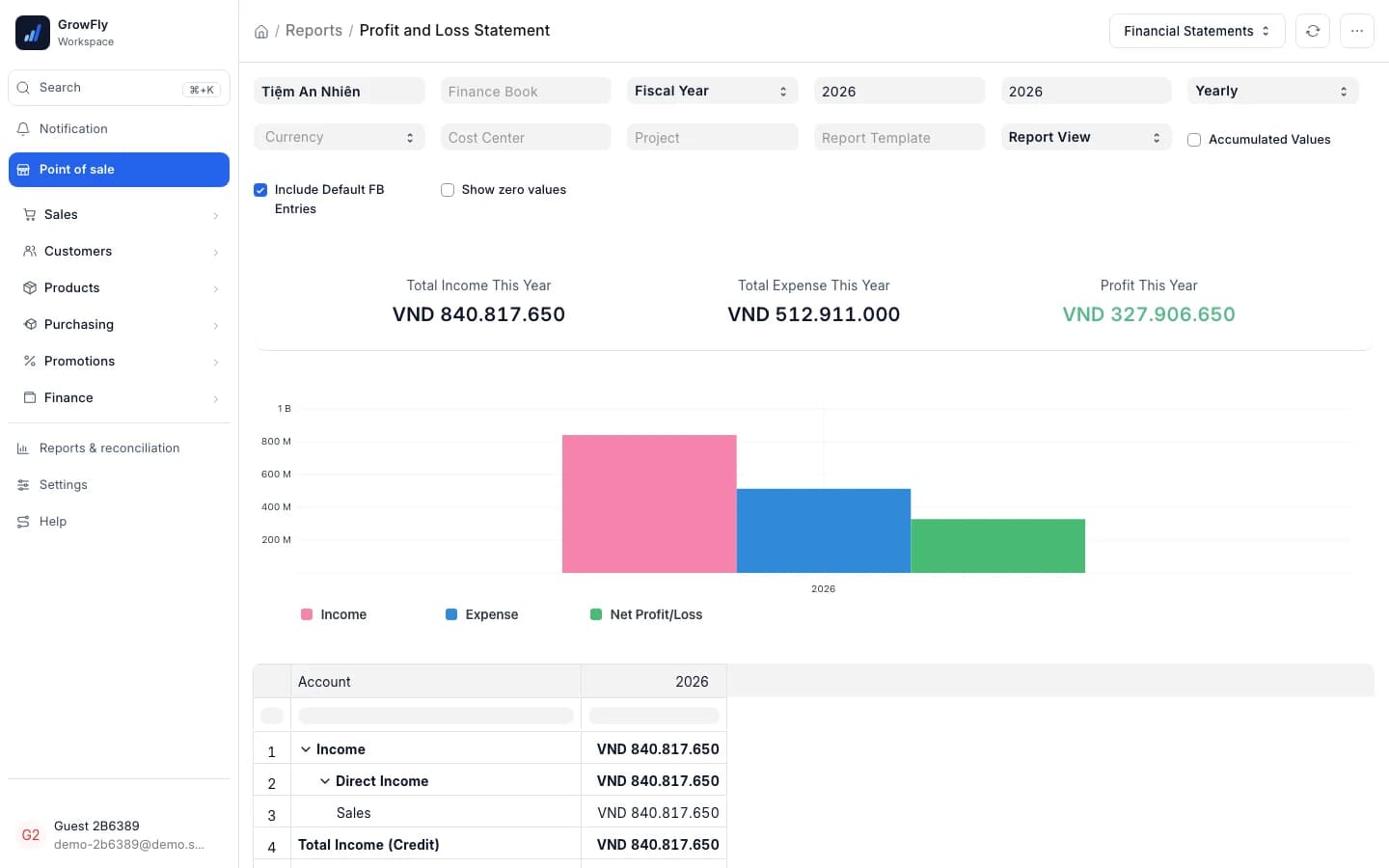
Sales, purchases, payments in and out, stock moves — every document that is confirmed posts itself to double-entry books. The ledger, P&L and sales reports are always up to date and nobody types anything twice. Try it below: 4 presses from an invoice to the report.
Use the real GrowFly, right here
This is not a picture: you go into the software itself, on a sample shop with products, customers and orders. The try-it guide walks you through this line of work step by step.
On a phone, the GrowFly app opens in a new tab.
- A shared sample shop — don't enter real information.
- Data is refreshed every night at 3:00 (Vietnam time).
- Payments, shipments and e-invoices in the demo are simulated.
No bookkeeping knowledge needed
Owners can read the reports, accountants get the full books
Sales staff only do sales work. The debits and credits, cost of goods and receivables are written for them.
Press Submit and the books are done
Staff confirm the invoice as they always do. Revenue, cost of goods and the customer's debt appear in the general ledger — nobody has to learn journal entries.
Each report is a question you already ask
"What did we sell today, how was it paid, what should be in the drawer", "Who owes us, how much, for how long", "What sells and what just sits" — one report per question.
Pick a period, compare in one press
Today, this month, this quarter… 11 periods ready to pick. Press "Same period last month" and every figure shows how far it moved.
From double entry to the end-of-day slip
Standard statements for the accountant and reports written for the people who sell — from the same numbers.
Double entry, written for you
Sales, purchases, money in, money out, stock moves: confirm the document and its entries are there, cost of goods included.
Every book an accountant needs
General ledger, trial balance, balance sheet, profit and loss, cash flow, accounts payable, purchase register.
End-of-day report on 80 mm paper
What was sold, how it was paid, what the drawer should hold and what was counted — printed on the till's receipt printer.
Sales report: charts and tables
7 headline figures, the trend, busy hours, channels, customer groups; tables by store, region, item group, staff and best sellers.
Best sellers & margin
A/B/C ranking by sales, ranking by gross profit, and the slow movers picked out.
Stock in / out
Opening, received, sold, returned, moved, written off, counted and closing stock of each product.
Customer debt, cash book
Who owes how much and for how long; cash at each store and each bank account: opening, in, out, closing.
Business results, bank reconciliation
Real profit after cost of goods and expenses, month by month; the books' bank balance checked against the statement.
Three reports owners open every day
Next to the standard books for the accountant, GrowFly has 7 reports written in the words of people who sell.
End-of-day report
Close the day on one 80 mm slip
The whole day of a store: sales, money taken by each payment method, what is still to be collected, and the cash the drawer should hold against what the cashier counted. Printed on the till's receipt printer.
- View as summary, shifts, invoices, money in and out, or items
- Cashiers see only their own shifts and invoices
AN PHAT CO., LTD
END-OF-DAY REPORT
Cau Giay store · 22/10/2026
Money in by method
Cash in the drawer
2 shifts · closed
Best sellers & margin
See what keeps the store going — and what just sits
The report ranks products by sales into A/B/C, by gross profit, and picks out the slow movers: in stock but unsold for 14 days, or with more than 90 days of stock at the current pace.
- Group A: the products that make the first 80% of sales
- Ranking by profit only shows for people allowed to see costs
Best sellers & margin
This month| Product | Rank | Sales | Gross profit |
|---|---|---|---|
| Steel vacuum flask 500ml | A | 169,965,000 | 60,338,000 |
| Set of 4 white cups 350ml | A | 119,975,000 | 39,592,000 |
| Cotton bath towel 70×140 | A | 89,982,000 | 31,494,000 |
| 3-compartment glass lunch box | B | 41,260,000 | 12,791,000 |
| Printed ceramic mug 300ml | C | 6,320,000 | 1,643,000 |
Slow movers: in stock but unsold for 14 days, or more than 90 days of stock at the current pace.
Accounting books
Your accountant opens it and the books are there
Every document is already posted in double entry, so the standard accounting reports always have numbers. COD and bank reconciliation sit right next to them under Reports & reconciliation.
- Close a finished period to new entries
- Chart of accounts and fiscal years under Settings → Accounting
Reports & reconciliation
Accounting books
- General ledgerEvery entry of an account, a customer or a supplier, with its running balance.
- Trial balanceOpening balance, debits, credits and closing balance of each account.
- Balance sheetWhat the business owns, owes and is worth at a date.
- Profit and loss by accountIncome and expenses by account, period by period.
- Cash flowCash in and out from operations, investing and financing.
- Supplier debtWhat you owe each supplier, and for how long.
Reconciliation
- COD reconciliation reportWhat carriers still hold of the cash they collected.
- Bank reconciliation statementThe books' bank balance against the statement's, and payments not yet cleared.
Every part of GrowFly feeds the books
There is no data entry that exists only for the accountant.
- Point of saleEvery till sale posts revenue, money and cost of goods as it happens; the end-of-day report reads those same sales.
- PurchasingPurchase invoices record what you owe suppliers; accounts payable and the purchase register update at once.
- InventoryReceiving, issuing, transferring and counting stock all post its value; Stock in / out agrees with the books.
- Orders & deliveryCOD reconciliation posts what the carrier paid and the fees it kept; the report shows how much cash the carrier still holds.
- E-invoicesThe E-invoice status report shows which invoices are not issued yet or were rejected.
Good to know
- A new shop starts with a calendar fiscal year, whole-đồng amounts and ERPNext's standard chart of accounts — GrowFly is built on ERPNext. Your accountant adds or edits accounts under Settings → Accounting.
- Each store is a warehouse. A manager limited to one warehouse sees only that store's figures in reports.
- Gross profit, margin and cost only show for people allowed to see costs.
- Bank reconciliation and payment matching use ERPNext's standard tools, in the Finance menu.
How the books run
- 1
Work as usual
Sell, receive goods, pay and get paid, move stock — confirmed documents post themselves.
- 2
Pick a report and a period
11 ready periods; compare with the previous or the same period in one press.
- 3
The accountant reviews and closes
Reconcile the bank and COD, then close the finished period.
I'm not an accountant. Can I still use it?
Yes. You sell, receive goods, pay and get paid as usual; every confirmed document posts itself in double entry. The sales, end-of-day, customer debt and cash book reports are in everyday words. The books are there for your accountant to review.
Which books does my accountant get?
General ledger, trial balance, balance sheet, profit and loss by account, cash flow, accounts payable, purchase register and the bank reconciliation statement. GrowFly is built on ERPNext, so these are ERPNext's standard accounting reports.
Can staff see our profit?
Not unless you allow it. Gross profit, margin and cost only show for people allowed to see costs. A cashier opening the end-of-day report sees only their own shifts and invoices.
How do I compare with last month or last year?
Every report has a Period box (11 presets or your own dates) and a Compare with box: previous period, same period last month, same period last year, or your own dates. Figures and charts show the change straight away.
Is there bank reconciliation?
Yes. The Finance menu has Bank reconciliation and payment matching — ERPNext's standard tools. The bank reconciliation statement checks the books' bank balance against the statement and lists what has not cleared yet.
Does my old data from KiotViet or MISA eShop go into the books?
Yes. Migration from KiotViet brings sales history, payments, the cash book and debts into the books; from MISA eShop, invoices from a date you choose. It reads and checks everything first and posts only when you press "Post to books".
Open the demo shop's books
Sales report, end-of-day report, general ledger — on sample data that is already posted.