E-invoices
Every sale gets its e-invoice, with no extra button
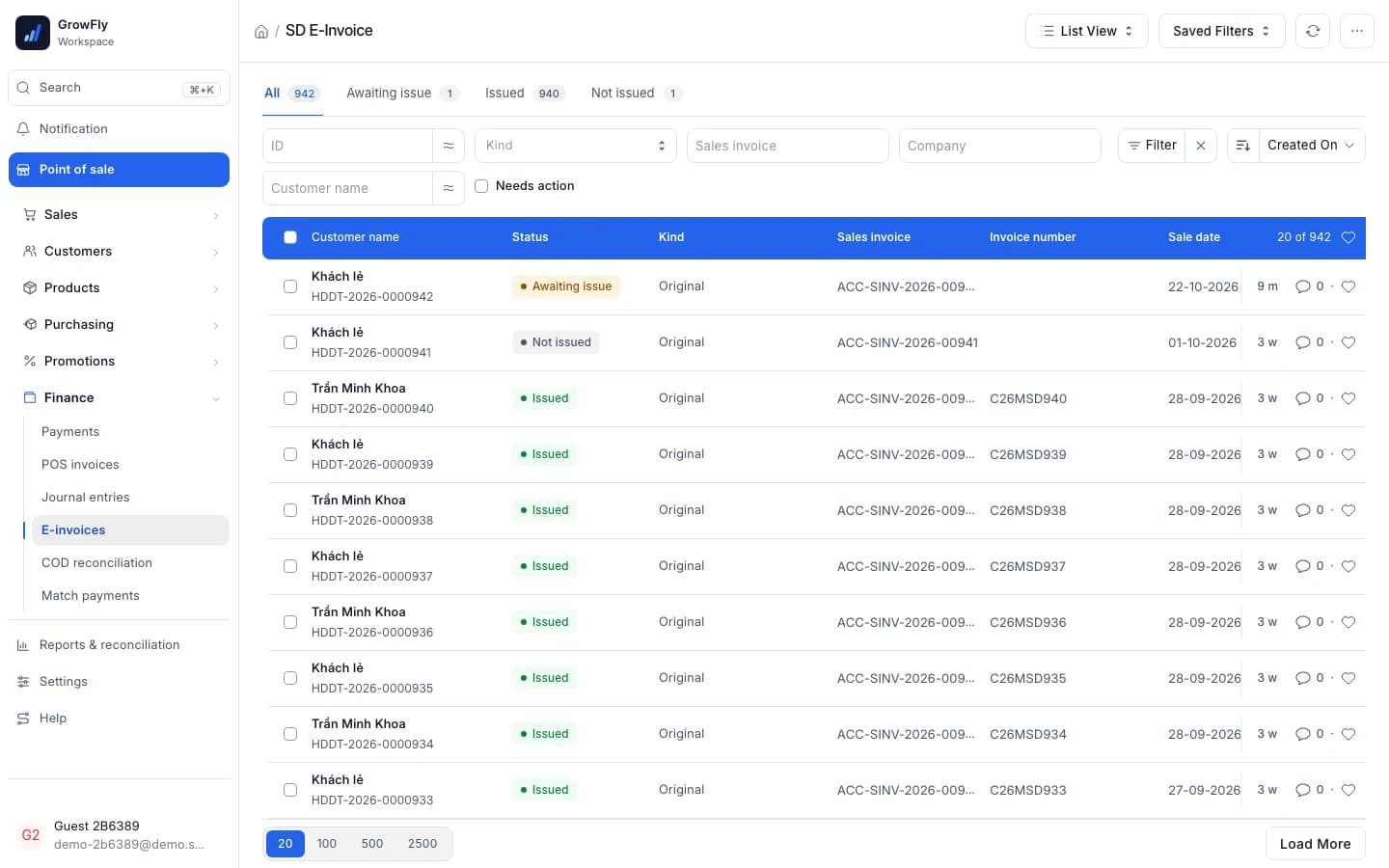
GrowFly issues a cash-register e-invoice through Viettel SInvoice for every sale, as soon as the sale is confirmed. When a customer returns goods the adjustment invoice makes itself, and a shaky connection never produces two invoices. Try it below.
Use the real GrowFly, right here
This is not a picture: you go into the software itself, on a sample shop with products, customers and orders. The try-it guide walks you through this line of work step by step.
On a phone, the GrowFly app opens in a new tab.
- A shared sample shop — don't enter real information.
- Data is refreshed every night at 3:00 (Vietnam time).
- Payments, shipments and e-invoices in the demo are simulated.
No e-invoice know-how needed
Sales staff have nothing new to learn
The e-invoice follows the sale. The hard parts — invoice numbers, transaction IDs, resending after an error — are handled for them.
There is no "issue invoice" step
Staff confirm the sale as usual. The invoice goes to Viettel and its number comes back by itself — no provider website, nothing typed twice.
Press Cancel by mistake? It shows the way
An issued invoice cannot be cancelled. GrowFly says what to do instead: goods coming back, use Return; made out wrongly, use Issue replacement invoice.
Company customers don't spell out their tax ID
For a customer with a tax ID, the company name and tax ID come from the customer record. A walk-in buyer who wants an invoice: tick "Buyer wants an invoice" at payment.
An e-invoice with every sale
From issuing to returns and corrections, following Decree 254/2026 and Circular 91/2026.
One invoice per sale
Every sale of a connected business gets an e-invoice, created as the sale is confirmed and then sent to Viettel SInvoice.
Never issued twice
The transaction ID is fixed at the first send. If the answer is lost, it waits 120 s and asks Viettel before sending again.
Cash-register series
Uses a series with an M, such as C26MAA; each till can have its own.
Returns adjust by themselves
A return makes a decreasing adjustment invoice that names the original.
Mistakes are replaced
Wrong items, price or buyer: issue a replacement invoice and the old one becomes Replaced.
Buyer: company or individual
A company needs a tax ID and registered name, a person their name; both need an address and an email for the invoice.
Receipt with number or lookup QR
The till waits up to 5 seconds to print the invoice number; after that it prints a QR to the lookup page.
10 statuses, one report
See which invoices are waiting, issuing, issued or failed; the E-invoice status report gathers what needs attention.
By the rules, and easy on the shop
What makes GrowFly's e-invoicing safe to leave running on its own.
Never twice
A shaky connection still makes one invoice
Each invoice keeps one transaction ID from its first send. If Viettel's answer is lost, GrowFly does not resend straight away: it waits 120 seconds and asks Viettel whether the invoice exists — if it does, it takes the number; if not, it resends exactly the same content.
- A sale whose invoice is on its way cannot be cancelled
- Nobody can press "Resend" on top of a send that is still out
Invoice ACC-SINV-2026-00412
Series C26MAA
- Sent to Viettel with a fixed transaction ID
- No answer came back — Unconfirmed
- Wait 120 seconds, send nothing
- Ask Viettel about that same transaction ID
- Viettel has it: take number 1284, never send twice
If Viettel has nothing, GrowFly resends the same content with the same transaction ID.
Replace & adjust
No cancelling — corrections the legal way
Under Decree 254/2026 and Circular 91/2026 an issued invoice is never cancelled. Goods returned: the return makes a decreasing adjustment invoice. Made out wrongly: "Issue replacement invoice" opens an amendment, and confirming it issues the new invoice in place of the old one.
- Only the buyer's details wrong: fix the buyer and the replacement issues itself
- The old invoice becomes Replaced
Original invoice
Issued
Replacement invoice
A new invoice takes the place of the wrong one.
Adjustment invoice
Adjusts only the part that was wrong, up or down.
Cancel the invoice — no longer allowed under Decree 254/2026 and Circular 91/2026
Customer returns? The adjustment invoice is created automatically.
Receipt & lookup
The invoice number prints on the receipt
When printing a receipt the till waits up to 5 seconds for the invoice number and the tax authority code. After 5 seconds it prints anyway, with a QR to the lookup page — which shows the number once it arrives and offers the PDF.
- The wait is adjustable in settings
- The lookup page carries your shop's name
Waits up to 5 s for the number
AN PHAT CO., LTD
SALES RECEIPT
E-INVOICE
Series: C26MAA
No.: 1286
Tax code: M1-26-HN7Q2-00000001286
Scan to look up and download the PDF
After 5 s: prints the lookup QR; the number shows on the lookup page when it arrives
Statuses
10 statuses, no invoice left behind
Every e-invoice is in one of three stages: not sent, on its way, done. The E-invoice status report gathers the ones that need someone; people with the accounts role are notified when one fails.
- "Create missing e-invoices" makes them for sales that have none
- In the app: Needs action · Issuing · Issued
Not sent
Nothing at Viettel yet
- Awaiting issue
- Awaiting original
- Issue failed
On its way
May already be at Viettel — ask first, never resend blind
- Issuing
- Unconfirmed
- Awaiting number
Done
Viettel has nothing more to do for it
- Issued
- Replaced
- Not issued
- Handled manually
The invoice follows the sale, wherever you sell
There is no separate "issue invoices" screen to remember.
- Point of saleTill sales get their e-invoice right after payment; the receipt prints the number or a lookup QR.
- Orders & deliveryDelivery orders get theirs when the sales invoice is made — on dispatch, when the carrier reports delivery, or by hand.
- Customers & ZaloA customer with a tax ID gets their company name and tax ID on the invoice; with Zalo messages on, they get a lookup link when it is issued.
- Mobile appThe mobile app has an e-invoice view: Needs action, Issuing, Issued.
- Accounting & reportsA return reduces revenue and the customer's debt in the books, at the same time as the adjustment invoice.
What you need
- The business's Viettel SInvoice account: the vinvoice.viettel.vn login (usually the tax ID), password and seller tax ID. API access must be switched on in the Viettel admin portal.
- A cash-register series (with an M, such as C26MAA) on the Viettel account; GrowFly fetches the list of series from Viettel.
- A start date: sales invoices before it get no e-invoice from GrowFly.
- To try it out, use Viettel's test account — never test with your real tax ID: issued invoices are real and cannot be cancelled.
- For now GrowFly connects to Viettel SInvoice only.
Getting started with e-invoices
- 1
Connect Viettel SInvoice
Enter the account, pick the series and the start date.
- 2
Sell as usual
Every confirmed sale gets its e-invoice.
- 3
Returns and fixes in one press
Returns adjust by themselves; mistakes are replaced.
What is a cash-register e-invoice?
An e-invoice made at the moment of sale by the sales software, carrying a tax authority code and a series with an M (such as C26MAA). In GrowFly every sale issues one through Viettel SInvoice.
Which e-invoice provider does GrowFly use?
Viettel SInvoice for now. The business uses its own Viettel account.
Can I cancel a wrong invoice?
No. Under Decree 254/2026 and Circular 91/2026 an issued invoice is never cancelled. Goods returned: make a return and the adjustment invoice issues itself. Made out wrongly: use "Issue replacement invoice".
Can a network error create two invoices?
No. The transaction ID is fixed at the first send. If the answer is lost, GrowFly waits 120 seconds, asks Viettel first, and only resends if Viettel has no such invoice.
What if a walk-in customer wants their name on the invoice?
On the till's payment screen, tick "Buyer wants an invoice" and enter the buyer's details. Unticked, the sale still gets its e-invoice, marked as a buyer who took no invoice.
Where does the customer see the invoice?
The receipt prints the invoice number, or a QR to a lookup page with your shop's name, where they can view it and download the PDF.
See the e-invoice of a sale you just made
Make a sale in the demo shop, then open its e-invoice and the lookup page as your customer would.